 Hushtop
Answer Claude Code approvals from the MacBook notch
Last updated: 11 October 2026
On this page
The wait#
Running a coding agent is twenty minutes of silence, then a three-second question. Miss the question and the three seconds quietly become another twenty minutes. Notifications get buried. A second monitor is one more place you aren’t looking. Auto-approving everything is tempting until you think about what “everything” includes.
The one spot on a MacBook you always see is the notch. That’s where Hushtop puts the question.
What you see#
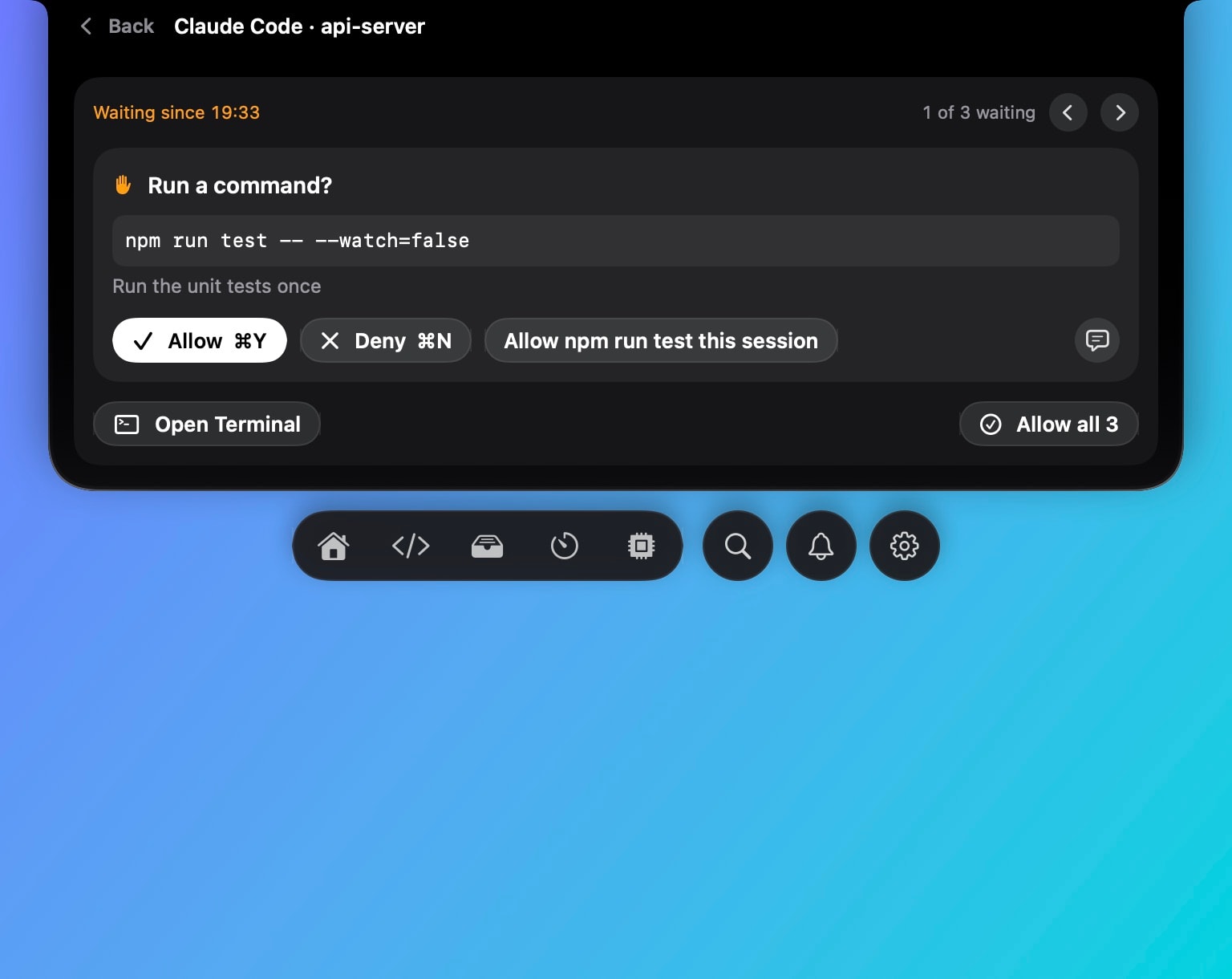
When Claude Code asks for permission, the notch grows and shows the request: the command it wants to run, the file it wants to edit, the question it’s asking, or the plan it wants approved, with its steps and the files it touches. You answer there. Allow and Deny go straight back to Claude. Answer in terminal hands it back and jumps to the session, including the exact tmux pane. Allow all clears a batch of ordinary requests, but never a question, a plan or a risky command.
If you answer in the terminal first, Hushtop watches the session transcript and withdraws the prompt from the notch.
The Dev panel lists every Claude Code and Codex session, the one that needs you first, and your 5-hour and weekly limits. The notch warns at 75% and 90% of a limit, so you stop hitting them blind.
How it works#
Claude Code has a PermissionRequest hook. Hushtop adds one entry to ~/.claude/settings.json that runs a small helper shipped inside the app. The helper sends the request over a local socket to Hushtop, waits for your decision, and prints it as the hook’s output. That’s the whole protocol.
- The hook’s timeout is 600 seconds. If you don’t answer, the helper says nothing and Claude asks in the terminal.
- If Hushtop isn’t running, or the feature is off, the helper says nothing and Claude asks in the terminal.
- There is no automatic allow and no automatic deny. Every decision is yours.
- The helper is only executed if it still exists; move or delete Hushtop and the hook is inert.
Every change Hushtop makes to your settings is shown as a diff before it’s written, a backup is kept, and Remove in Settings puts the file back. The exact hook entries are public, with removal notes, at github.com/FarhanRiuzaki/hushtop-hooks.
Codex too#
Codex reads hooks in Claude’s shape from ~/.codex/hooks.json and sends the same request. Hushtop connects it the same way; Codex asks you to trust the new hook once. One difference: Codex shows nothing in its terminal while a hook waits, so the wait is shorter (two minutes), then Codex asks there.
Awake while it works, asleep when it’s done#
Keep awake’s automatic mode keeps the Mac awake while an agent or a build is still running and releases it three minutes after the last one exits, lid closed included. You don’t get a laptop that stayed on all night because a session ended at 11 PM.
The rest of the notch#
Once that spot was useful, other things moved in: what’s playing with synced lyrics, the next meeting with a Join button, AirPods battery per bud, a drop shelf with AirDrop, clipboard history, Mac vitals. Every module is optional, so Hushtop can be as small as “tell me when Claude needs me”.
Native Swift, Apple silicon, macOS 15 or later. No account and no telemetry; the only network calls are the license check, the update check, and lyrics if you turn them on. Free for 7 days, then one payment. Install guide · More on the Claude Code setup.