 Hushtop
Your Claude Code limits, one glance up
Claude Code has a 5-hour window and a weekly window, and it only tells you about them when you’re already out. Hushtop keeps both in the notch, with when you’ll hit them at the pace you’re going.
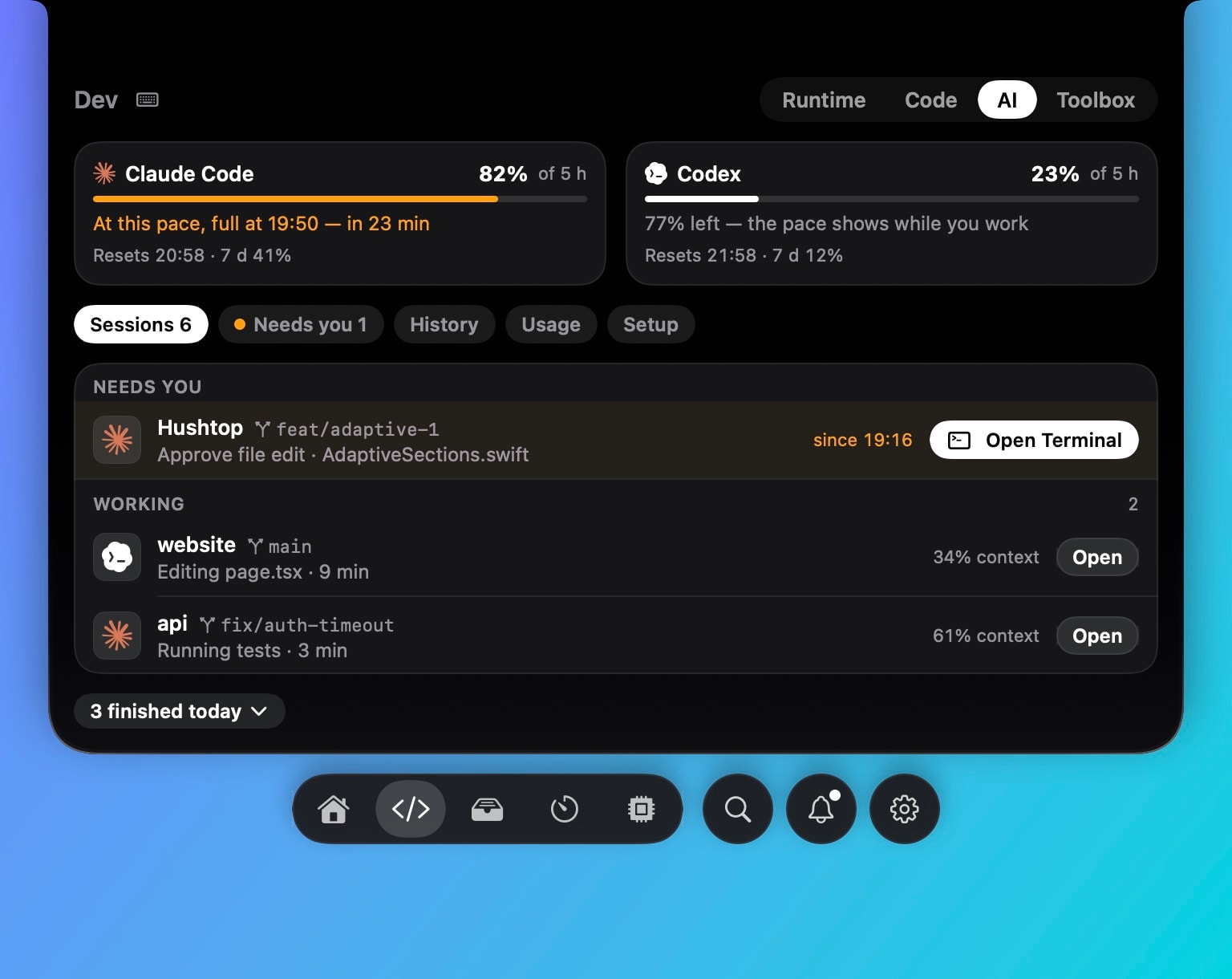
Two windows, always visible
The 5-hour limit and the weekly limit sit next to your sessions as rings, with the percentage used, when each window resets, and an estimate of when you’ll run out if you keep the current pace. Codex shows the same two numbers on its own ring.
A heads-up before it bites
You get a heads-up at 75% and again at 90%, and from 75% the notch ear changes so you see it without opening anything. The thresholds are yours to change. You also get a note when a window resets, which is the one people actually want: “you can go again.”
Where the numbers come from
Claude limits are read from Claude Code’s own status line, the same data the terminal shows. Hushtop wraps your existing status line and passes its text through, so nothing you had breaks. Reading limits from your Anthropic account instead is optional and off by default. Nothing is sent anywhere; there’s no account and no telemetry.
Tokens and cost, if you want them
Per session, Hushtop can show tokens used and an estimated cost at list prices. It’s an estimate, labelled as one, and it’s there so you know which project ate the afternoon.
The sessions themselves
Every Claude Code and Codex session is in the same list, with its project, branch and what it’s doing. The one waiting for your answer moves to the top, and with approvals on you answer it in the notch. More on sessions and approvals, and the write-up on how the hook works.
Facts
- Native Swift, Apple silicon, macOS 15 or later. Works on Macs without a notch as a floating island.
- Setup takes a minute: Hushtop shows the exact change to your Claude Code settings before writing it, keeps a backup, and Remove puts it back.
- Free for 7 days, then one payment. No subscription.
Questions
Where do the limit numbers come from?
From Claude Code’s own status line on your Mac. Reading them from your Anthropic account is optional and off by default.
When does it warn me?
At 75% and at 90% of a window, as a quiet ear on the notch. The panel shows when you’ll run out at the pace you’re going.
Does it need an account?
No. You download it and try it for 7 days. If you buy it, you enter a license key; there is no sign-up.
What does it send over the network?
Nothing about what you do. To check your license, Hushtop sends only your license key, an anonymous Mac ID and its version. Updates come only from hushtop.app. Features that need the internet, like lyrics or weather, stay off until you turn them on.